Managing your social media integrations is an important part of maintaining control over your data. If you’ve connected your Instagram account to Wizikey but no longer need this integration, there are two ways to remove it. Here’s a quick guide to help you disconnect your Instagram account.
Method 1: Remove Instagram Integration Directly (Recommended)

The simplest way to disconnect your Instagram account is through the direct removal option:
- Navigate to your Feed or Summary pages in Wizikey
- Locate the “Remove Instagram Integration” button (shown in red at the top right)
- Click the button to instantly disconnect your Instagram account
This method only removes the Instagram connection while keeping your Wizikey account and all other data intact.
Method 2: Delete Your Wizikey Account
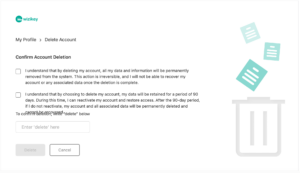
If you want to completely remove your presence from Wizikey along with all integrations:
- Go to My Profile > Delete Account
- Review the account deletion terms carefully:
- Your data will be retained for 90 days (grace period)
- During this time, you can reactivate your account
- After 90 days, all data is permanently deleted
- Check both confirmation boxes
- Type “delete” in the confirmation field
- Click the Delete button
Important: This method permanently removes your entire Wizikey account, not just the Instagram integration.
Which Method Should You Choose?
- Choose Method 1 if you only want to disconnect Instagram but continue using Wizikey
- Choose Method 2 if you want to completely close your Wizikey account
For most users, Method 1 is the preferred option as it’s quick, reversible, and doesn’t affect your other data or integrations.
Need to reconnect your Instagram later? You can always re-integrate it through your Wizikey settings.