Every PR person knows why a reliable journalist database matters. Most have inherited a spreadsheet called something like Media_List_FINAL_v4.xlsx, passed down from whoever held the role before them, with 340 rows and no note about when it was last touched.
It looks like an asset. It behaves like a liability.
Half those reporters have changed beats. A quarter have changed outlets. Some have left the industry. And you will not find out which is which until you send 340 emails and watch the bounces roll in – after the announcement has gone out, when there is nothing left to fix.
The journalist database inside Wizikey Engage exists to end that particular ritual. Not by giving you a bigger list, but by giving you a list that is right on the day you use it.
Why Bigger Lists Are Not Better Lists
There is a persistent idea in media relations that the winning move is volume – more contacts, wider blast, better odds. It is wrong, and journalists keep saying why: Muck Rack’s 2026 State of Journalism found that 43% of journalists seldom receive pitches relevant to what they cover.
A pitch that lands with a reporter who does not cover your category is not neutral. It costs you. It teaches that journalist that mail from your domain is noise, and that lesson sticks for the next pitch, the one that actually would have been relevant.
So the questions worth asking about any journalist database are not about size. They are:
- Does it know what this reporter covers now, not what they covered in 2023?
- Can I narrow to the twelve people who genuinely matter for this story?
- Will the contact details actually work?
- Can I go from “found them” to “pitched them” without exporting anything?
Here is how Wizikey answers each.
What’s Actually in the Wizikey Journalist Database
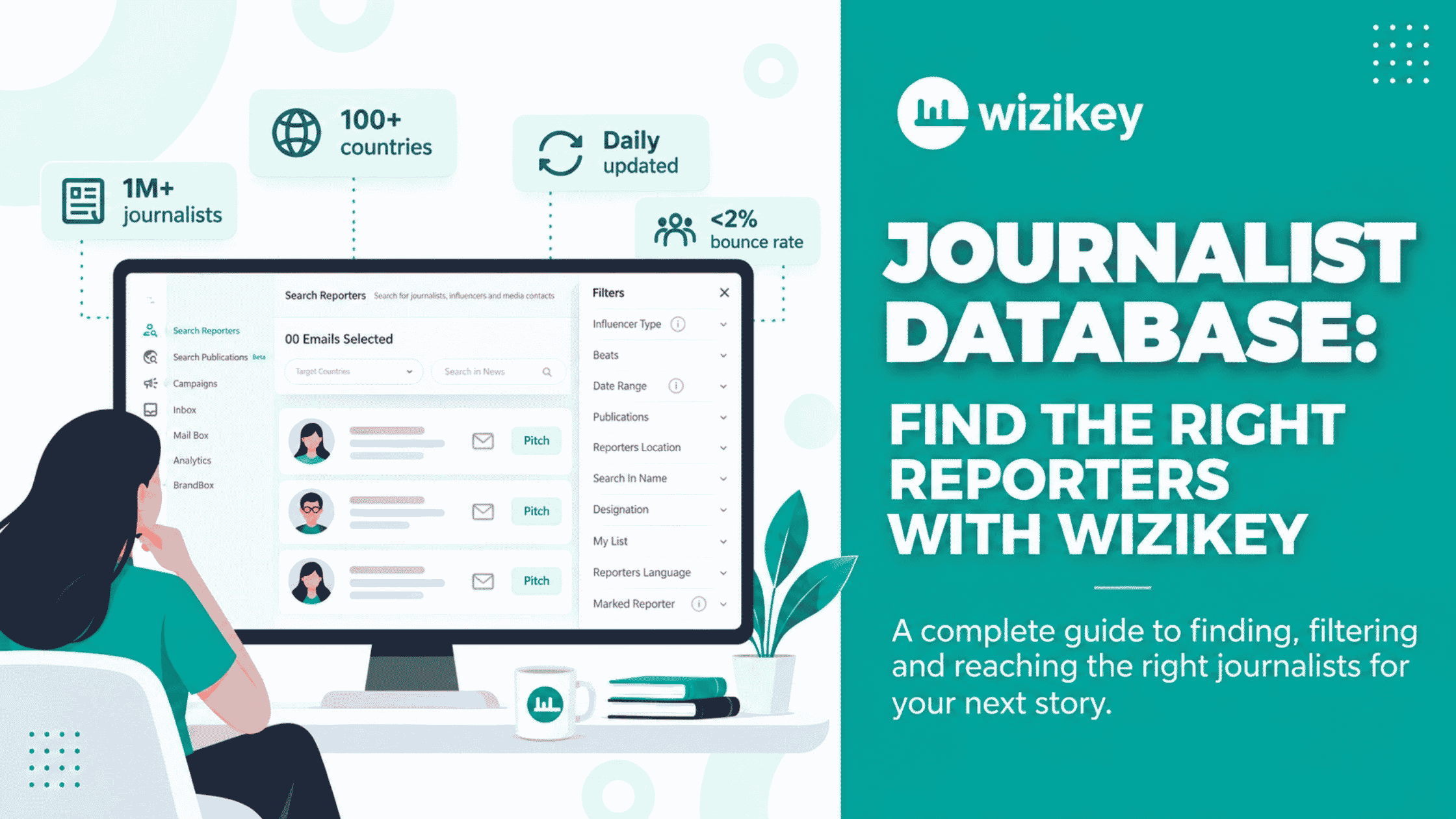
The Wizikey media database holds over one million journalist and outlet profiles across 100+ countries, with coverage spanning 50+ languages, refreshed on a daily cycle.
That last detail is the one that matters most, and it is the one most easily skipped past. More importantly, daily refresh means beat changes get caught as they happen. When a technology reporter moves to cover finance, the profile follows them. When someone changes outlets, the record updates rather than quietly rotting.
Just as importantly, the stated bounce rate on contacts is below 2%. For anyone who has run a launch off an inherited spreadsheet, that number is the whole pitch.
The Beats We Cover
Wizikey classifies journalists in the database by beat, which becomes the primary way to narrow your search. Technology, Business, Startups, Finance and Consumer are among the most densely covered – a single market slice can return dozens of active reporters per beat.
Beats are not a static tag you set once. Because profiles refresh daily against what each journalist is actually publishing, a reporter’s beat classification reflects their recent output. This is what stops the classic failure mode where you pitch a fintech story to someone who covered fintech two years ago and now writes about climate policy.
Four Ways to Narrow the Room
1. Keyword Search
Start with what the story is about, not who you already know.
Type the subject of your announcement – “quick commerce,” “GST compliance,” “battery swapping” – and the database returns journalists who have recently written about it. This inverts the usual workflow. Instead of starting with a list of names and hoping some of them are relevant, you start with the topic and let the coverage evidence surface the names.
It is also how you find the reporters you would never have thought of. The trade journalist at a publication outside your usual orbit who has covered your exact niche three times this quarter is a far better bet than the marquee byline at a national daily who has never touched the category.
2. Beat
Filter to the beat that matches your story. Straightforward, and the fastest way to cut a thousand-name field to a workable shortlist.
In practice, the useful discipline is to filter narrower than feels comfortable. “Business” is not a beat, it is a floor of a building. “Startups” or “Finance” gets you closer to people who will recognise why your news is news.
3. Reporter Location
Regional filtering does two jobs.
The obvious one: if you are announcing a facility in Pune, you want reporters who cover Pune. Local and regional press are consistently under-pitched and consistently more likely to run a story that a national desk would pass on.
More importantly, there’s a second benefit: time zones. Knowing where a reporter sits tells you when your pitch lands in their inbox – and a pitch that arrives at 3am local time competes with everything else that arrived overnight.
4. Publication
Sometimes the brief comes down from above as a name: “we want to be in that publication.” Filter by outlet and you get every journalist there, with their beats attached, so you can pick the one whose actual coverage area fits – rather than mailing the editor-in-chief and hoping it gets forwarded.
Publication filtering is also how you audit your own reach. Filter to the ten outlets that matter in your category, and you have an honest map of who you are and are not currently reaching.
Relevance Scoring: The Filter You Don’t Set
Beyond the filters you set, Wizikey relevance-scores the results and ranks journalists by how likely they are to cover your story.
This is the difference between a database and a directory. A directory hands you names in alphabetical order and leaves the judgement to you. Scoring puts the judgement in the tool, ordered by evidence of what each reporter actually writes about.
Treat it as a strong first draft of your shortlist, not gospel. You know things about your story the scoring cannot – an existing relationship, an embargo dynamic, a reporter who covered your competitor last month and would love the counter-story.
Where You Can Reach Out
The database spans 100+ countries, which means the discovery layer is genuinely global – you can research the German trade press or the Southeast Asian tech beat from the same interface you use for domestic media.
Meanwhile, campaigns in Engage are country-specific by design- you launch outreach against a market rather than a global blast, and track results per market. For teams running multi-country announcements, this is what keeps the reporting legible afterwards: you can see that the story landed in three markets and stalled in a fourth, which is a fact you can act on.
From Search to Sent, Without Leaving the Tab
The part that saves the most time is the part with the least to demo.
Once you have your shortlist from the journalist database, you can pitch from inside Wizikey. No export to CSV, no import into a mail tool, no separate tracker to update by hand.
What that unlocks:
- Media lists you build once, then share across the team and reuse for the next announcement, rather than everyone maintaining a private spreadsheet.
- Conversation history against each reporter, so the next person to pitch them knows what was already sent and how it went.
- Campaign analytics connecting who you pitched to what actually ran.
That last connection is the one most PR stacks break. Pitching happens in one tool, coverage tracking in another, and nobody can answer “did the outreach work?” without a manual reconciliation exercise. Keeping both in Engage means the answer is a screen, not a project.
A Working Example
Say you are announcing a Series B for a logistics startup, headquartered in Bengaluru, with an expansion into the UAE attached to the news.
The spreadsheet approach: open the inherited file, sort by “Tech,” pick everyone who looks plausible, send 200 emails, get 40 bounces, get three replies, one of which is a reporter asking to be removed from the list.
The database approach:
- Keyword search “logistics funding” to surface reporters with recent, demonstrated interest in the category.
- Filter to Startups and Finance beats – this story is both, and the two lists will not fully overlap.
- Filter by reporter location to Bengaluru for the regional angle, then run a second pass on UAE for the expansion angle. Two shortlists, two pitches, two framings.
- Add the four target publications the founder named, and pick the right journalist at each rather than the most senior one.
- Save both shortlists as media lists so the next round of funding news starts from here instead of from scratch.
- Pitch from inside Wizikey and let campaign analytics tell you which of the two angles actually converted.
Same announcement. But the second version takes less time and produces a list you can defend in a room.
FAQs
How large is the Wizikey media database?
Over one million journalist and outlet profiles across more than 100 countries, covering 50+ languages.
How often is contact data updated?
Daily. Profiles refresh against journalists’ recent published coverage, which is how beat changes and outlet moves get caught.
What is the bounce rate on contacts?
Below 2%.
Can I search by topic instead of by name?
Yes – keyword search returns journalists based on what they have recently written about, which is usually a better starting point than a name you already have.
Can I filter by where a reporter is based?
Yes. Location filtering works for regional pitching and for timing your outreach sensibly across time zones.
Can I save and share a list with my team?
Yes. You can build a media list once, share it across the team, and reuse it for future campaigns. Wizikey does not charge per user, so there is no reason to keep lists private.
Do I have to export contacts to pitch them?
No. Pitching and tracking happen inside Wizikey Engage, so outreach and results stay attached to the search that produced them.